
Table of Contents
- Introduction: Risks When Using Genspark in a Company
- Does Genspark Use Your Input for AI Training? The Setting to Check First
- Considering Team / Enterprise for Company-Wide Use
- Important Security Measures for Corporate Use
- Towards Building a Secure Operational System
- Frequently Asked Questions
- Summary
Introduction: Risks When Using Genspark in a Company
When using Genspark for work, it's natural to wonder: "Is my input used to train the AI?" "Is it safe to upload customer information or internal documents?" "Are there settings I should check to prevent data leaks?" "Can we just keep using individual accounts once the whole company adopts it?"
Genspark has settings related to data usage, and its Team / Enterprise plans for businesses come with a zero-training policy that excludes your input data and generated content from being used to train Genspark's AI models.
That said, no matter how strong the service-side security is, it doesn't mean you should carelessly send API keys, passwords, or customers' names and email addresses to the AI. To reduce that risk myself, I also built a free tool called "AI Secret Guard: Kanmeika-kun," which pseudonymizes personal and confidential information locally on your PC before you hand a document to an AI.
This article covers AI training, data retention, data leaks, personal information, file uploads, business plans, and how to reduce what you send to the AI in the first place, based on Genspark's official information as of August 2026.
Organizations such as IPA (Information-technology Promotion Agency, Japan) and NISC (National Center of Incident Readiness and Strategy for Cybersecurity) have also issued warnings regarding data handling when using cloud-based AI services. Please use this article as part of internal verification before introduction, or as part of Genspark troubleshooting.
Does Genspark Use Your Input for AI Training? The Setting to Check First
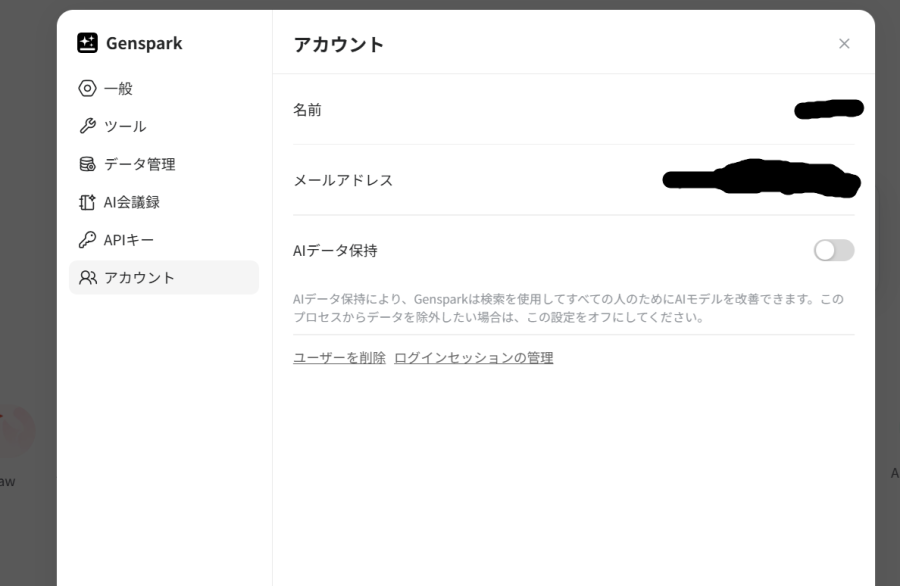
If you're on an individual plan, start by checking the "AI Data Retention" setting. In Genspark's default settings, "AI Data Retention" is enabled for the purpose of improving service quality, and there is a possibility that input prompts may be used for learning. When used by businesses, to prevent unintended learning of confidential information, it is strongly recommended to turn this setting off first.
On Team / Enterprise plans, by contrast, a zero-training policy applies by default, excluding your input data and generated content from being used to train Genspark's AI models. Rather than relying on every individual user to remember to flip a data-retention toggle, it may be worth reconsidering the plan itself.
Before creating an account and starting business use, be sure to disable AI data learning settings by following the steps below. This setting must be configured individually for each user's account.
Specific Steps for Changing Settings
Changing the settings can be completed with a few clicks from the browser interface.
- Click the "Account Mark (Profile Icon)" in the bottom left of the screen.
- From the displayed menu, click "Settings".
- From the left-hand menu on the settings screen, select the "Account" tab.
- Click the "AI Data Retention" toggle switch displayed on the screen, and change it to the OFF state.
If the switch is grayed out and in the OFF state, the settings are complete. This prevents your input prompts and search history from being used for building future AI learning models.
Furthermore, if advanced management functions and permission settings for corporate use are required, considering the introduction of a paid plan is one option. The pricing page is here: Genspark Pricing Page (pricing details are further down the page)
Considering Team / Enterprise for Company-Wide Use
Employees could each subscribe to Genspark individually, but rolling it out company-wide is easier to manage on a Team or Enterprise plan.
Genspark's business plans are built with corporate use in mind, and typically include:
- A zero-training policy that excludes your input data and generated content from AI model training
- SOC 2 Type II
- ISO 27001
- SSO / SAML
- Team-level account management
- An admin dashboard
Unlike a scenario where each employee separately pays for an individual Plus subscription, having administrators who can see accounts and usage across the organization is a meaningful difference for corporate use.
For Businesses in Japan
For companies based in Japan, Genspark also has an official local reseller, SOURCENEXT. SOURCENEXT offers Genspark Team plans for business customers, with Japanese-language support, JPY billing, and implementation consulting. This can be useful for Japanese companies that prefer to work with a domestic vendor instead of contracting directly with an overseas AI provider. As of August 2026, SOURCENEXT has temporarily paused new applications and inquiries, so check its official page for the current status before relying on this option.
Important Security Measures for Corporate Use
In addition to changing system-side settings, users also need to pay close attention to "how they use" the tool. Here, we introduce specific security measures that should be observed when using Genspark in a corporate environment.
1. Prohibition of Inputting Confidential Information (API Keys, Passwords)
Not being used for AI training and being safe to enter secrets into are two different things.
When requesting Genspark to generate or debug programming code, there are instances where source code is copied and pasted as is. However, it is essential to check before sending if the code contains database passwords or API keys for services like AWS, GCP, etc.
Entering cloud service authentication information (credentials) into a chat directly leads to serious security incidents. In the OWASP Top 10, sensitive data exposure is consistently listed as a top threat.
When passing code to AI, cultivate the habit of replacing sensitive parts with dummy text (e.g., YOUR_API_KEY_HERE), or rewriting it into a secure implementation using GitHub Secrets or environment variables (such as dotenv) before inputting it. Being mindful of how to write secure code significantly reduces the risk of information leakage.
2. Don't Hand Customer or Personal Information to the AI As-Is
If you're passing along documents that include names, company names, email addresses, phone numbers, addresses, or monetary amounts, it's worth checking your contract terms and internal rules first. Meeting notes, contracts, quotes, customer lists, and customer data in spreadsheets often contain more personal information than people realize.
Genspark's Team / Enterprise plans include enterprise-grade data protections such as zero-training, but it's still worth avoiding sending personal information to the AI that it doesn't actually need.
Where needed, you can pseudonymize information before sending it — for example, replacing "John Smith" with "Customer A" or "ABC Corp." with "Vendor B."
I also built a small Windows utility, "AI Secret Guard: Kanmeika-kun," that pseudonymizes sensitive information locally on your PC — with no internet connection required for the pseudonymization step itself — before you send text to an AI service, and can restore the original values in the AI's reply afterward. It's not a guarantee against leaks (it can miss things, so you should still check the output yourself), but it's one option when you want the AI to read a document without needing to know the actual names involved.
3. Check Files Before Uploading Them to Genspark
Before uploading a file, check whether it contains names, email addresses, phone numbers, addresses, API keys, passwords, or confidential business information. If the AI doesn't need that information to do the task, it's safer to remove or pseudonymize it before uploading.
4. Copyright and Consideration for External Output
Genspark generates high-quality reports (Sparkpages) based on information from the internet, but when reprinting the generated text as is on a company's official blog or in commercial products, the risk of copyright infringement must be considered.
When using AI-generated content, it is essential to perform manual fact-checking, and, while referencing AI risk management frameworks proposed by organizations like NIST (National Institute of Standards and Technology), a process is needed to ensure the company takes responsibility for the final output.
Towards Building a Secure Operational System
To safely utilize the tool, not only system settings but also raising awareness across the entire organization is crucial. Many companies are developing "internal guidelines" regarding the use of AI tools.
- Specification of usable AI tools (whitelisting)
- Definition of information levels that must not be input (classification of confidential information, personal information, etc.)
- Obligation to opt-out (disable) "AI Data Retention"
- Review system for using generated code or text in business operations
By clarifying these rules and thoroughly disseminating them through regular internal workshops, etc., Genspark's powerful research capabilities can be leveraged for business while minimizing risks. It is important to formulate guidelines and ensure safe usage throughout the organization.
If you want to manage settings and security collectively for a team, it is important to regularly check the trends of enterprise-grade features and plans that allow administrators to apply policies centrally.
Frequently Asked Questions
How can a Japanese company sign a business contract for Genspark?
You can contract directly through the Genspark official website, or in Japan, through the official reseller SOURCENEXT, which offers a Team plan for businesses. Japanese-language support, JPY billing, and implementation consulting make it an option for Japanese companies rolling this out to a larger group of users.
How can I avoid sending personal information to Genspark?
You can remove or pseudonymize personal information that the AI doesn't need before sending it. My free tool, "AI Secret Guard: Kanmeika-kun," replaces names, company names, amounts, phone numbers, email addresses, and addresses with placeholders locally on your PC before you pass the text to an AI.
Summary
To use Genspark safely in a business setting, the following measures matter:
- Check settings such as AI Data Retention
- Check the AI training policy of the plan you're on
- Never input API keys or passwords
- Don't send more personal or customer information to the AI than necessary
- Check file contents before uploading
- Consider Team / Enterprise for company-wide use
- Establish internal AI usage rules
Genspark's Team / Enterprise plans come with a zero-training policy, SOC 2 Type II, and ISO 27001 — mechanisms built with corporate use in mind. Japanese companies also have the option of going through the official reseller SOURCENEXT to get Japanese-language support along the way.
On top of that, it's worth deleting or pseudonymizing names and company names the AI doesn't need before sending anything — reducing the data you send in the first place, rather than relying on the service's security alone. I've released my own tool for that purpose, "AI Secret Guard: Kanmeika-kun," for free, in case it's useful to you.
The settings and operational methods introduced in this article are the first step to reducing the risk of information leakage. Please collaborate with your internal security personnel and legal department to continuously verify that operations comply with your company's security standards.