I normally use Genspark on my PC, but the other day, while using the AI chat as usual, I noticed something that caught my attention.
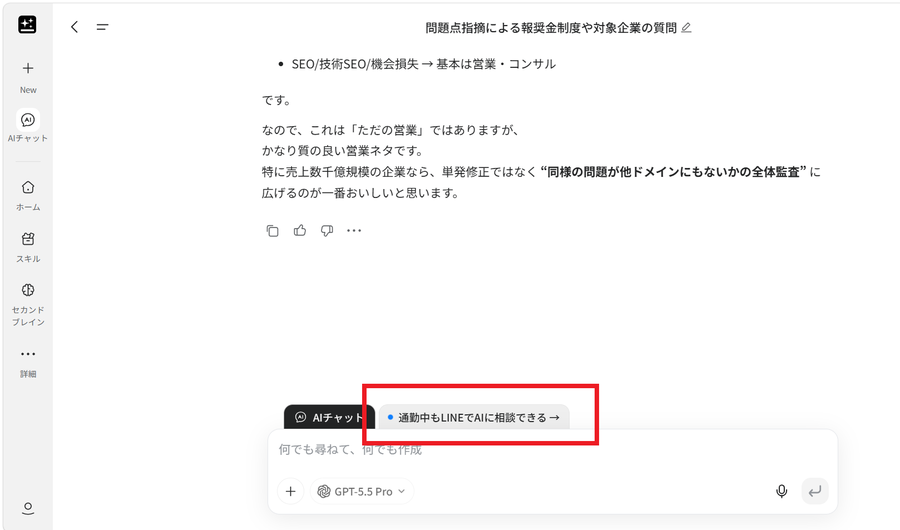
"Talk to AI on LINE, even during your commute →"
As you can see in the screenshot, this message suddenly appeared on the Genspark AI chat screen.
I remember thinking:
"When did Genspark and LINE become integrated?"
I clicked it to find out, and sure enough, I could now use Genspark directly from LINE.
Even better, you receive 1,000 credits just for connecting LINE to Genspark.
For people living in Japan who use LINE every day, I think this is a surprisingly useful feature.
The short version
- Genspark now connects to LINE, so you can message it questions from the LINE app you already use — checking your schedule, checking email, generating images, and checking stocks all through LINE
- Connecting is free and gives you 1,000 credits. Normal conversation uses no credits; web search or connected services (Calendar, Gmail) use roughly 20–30 credits
- Setup is simple: click the notice in Genspark's PC chat → scan the QR code with your phone → add Genspark as a LINE friend
Table of Contents
What Can You Do with Genspark and LINE?
The basic idea is very simple.
You send a message to Genspark through LINE, and Genspark responds as an AI assistant.
In other words, you don't have to open the Genspark website or app every time. You can simply ask Genspark questions from the LINE interface you already use every day.
For example, you can send messages such as:
"What do I have scheduled this week?"
"What emails did I receive this week?"
"Generate an image of the Tokyo skyline with the aurora in the sky."
"Which stocks are going up?"
You just type your request into LINE like you would send any other message.
Of course, if you want Genspark to access services such as Google Calendar or Gmail, you need to connect those services to Genspark beforehand.
I Asked Genspark About My Schedule
After connecting Google Calendar to Genspark, I sent this message from LINE:
"What do I have scheduled this week?"
Genspark checked my calendar and gave me a list of my upcoming events.
It's pretty convenient to check your schedule without having to open Google Calendar.
You Can Check Your Recent Emails Too
I also connected Gmail and asked:
"What emails did I receive this week?"
Genspark was able to check my email and provide an answer.
This could be particularly useful when you need to check your email but don't have your PC in front of you.
You Can Even Generate Images from LINE
Next, I tried something a little more interesting.
I asked:
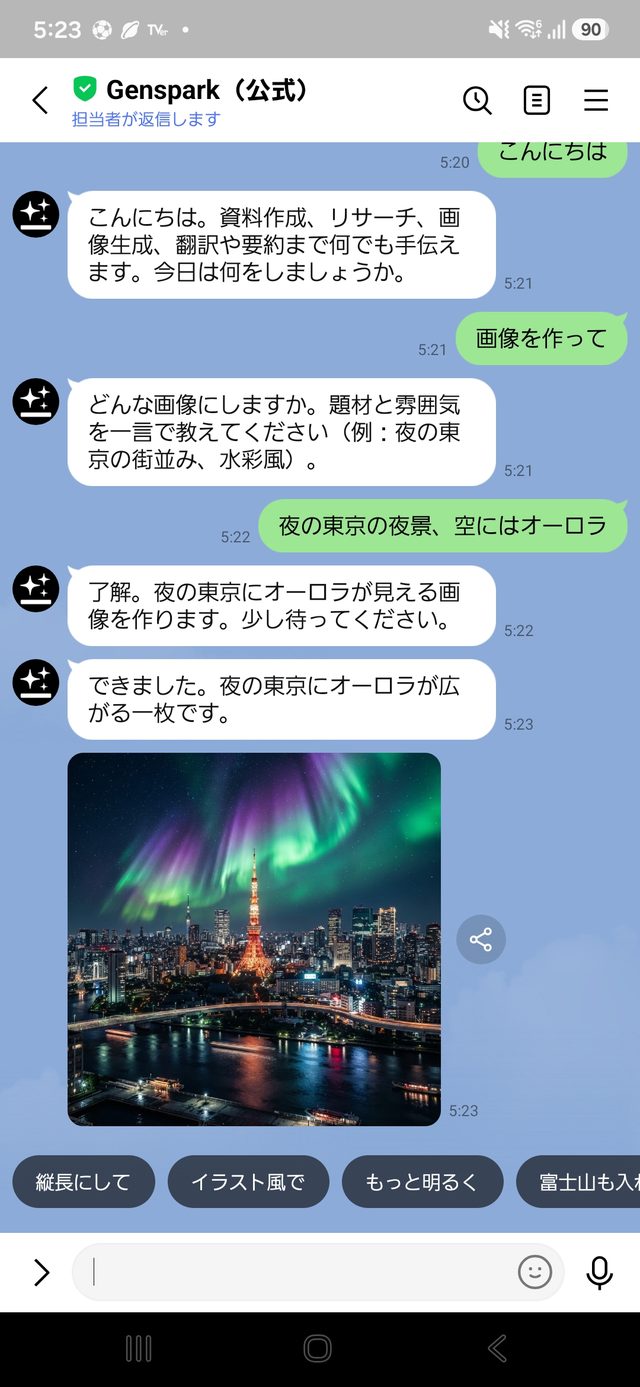
"Generate an image of the Tokyo skyline with the aurora in the sky."
And Genspark actually generated the image.
Being able to use Genspark's features directly from LINE, rather than just having a basic AI conversation, is pretty interesting.
I Also Asked About Rising Stocks
I tried asking:
"Which stocks are going up?"
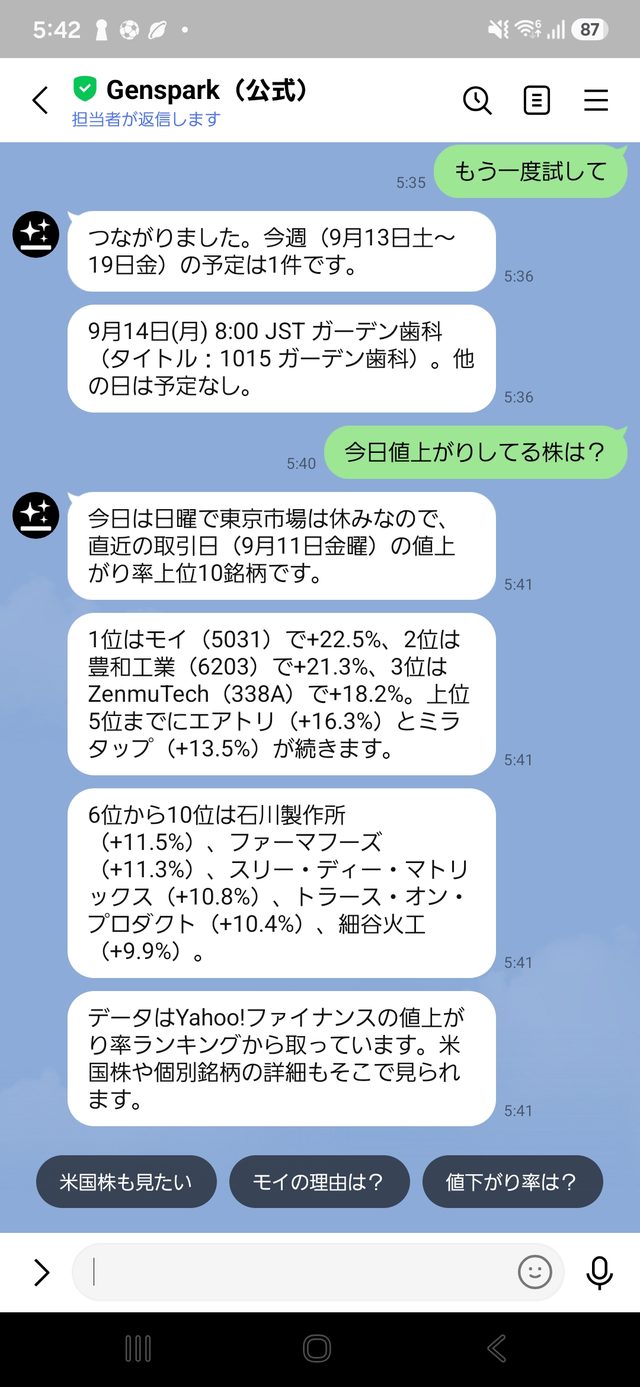
Genspark provided an answer for that as well.
So you can use LINE for everything from quick questions and web research to checking information from services connected to Genspark.
Responses from LINE Are a Little Slow
One thing I noticed from actually using the feature is that the responses take a little while to arrive.
In my tests, it sometimes took around 20–30 seconds to receive a response.
However, there is an interesting advantage to using Genspark through LINE.
You don't have to keep staring at the LINE screen while you wait.
Once Genspark finishes generating its response, you receive a notification in LINE.
That means you can do something like this:
"I'll send my question to Genspark and put my phone back in my pocket."
For example, while commuting, you could send:
"What do I have scheduled today?"
Then continue with whatever you were doing and check the answer when the LINE notification arrives.
That is exactly what Genspark means by:
"Talk to AI on LINE, even during your commute."
Is Claude Opus 5 the Main AI Model Behind This Feature?
This was something I was curious about, so I asked Genspark's AI agent about it.
According to the answer I received, Claude Opus 5 is currently the main AI model used for this LINE integration.
However, I have not personally verified Genspark's internal implementation.
This information came from asking Genspark's own AI agent, so I would treat it as information provided by the AI rather than as independently verified technical documentation.
How to Connect Genspark to LINE
Setting it up is quite simple.
First, open the AI chat in the PC version of Genspark.
Look for the message:
"Talk to AI on LINE, even during your commute →"
and click it.
Genspark will then display a QR code for connecting to LINE.
Scan the QR code with your smartphone.
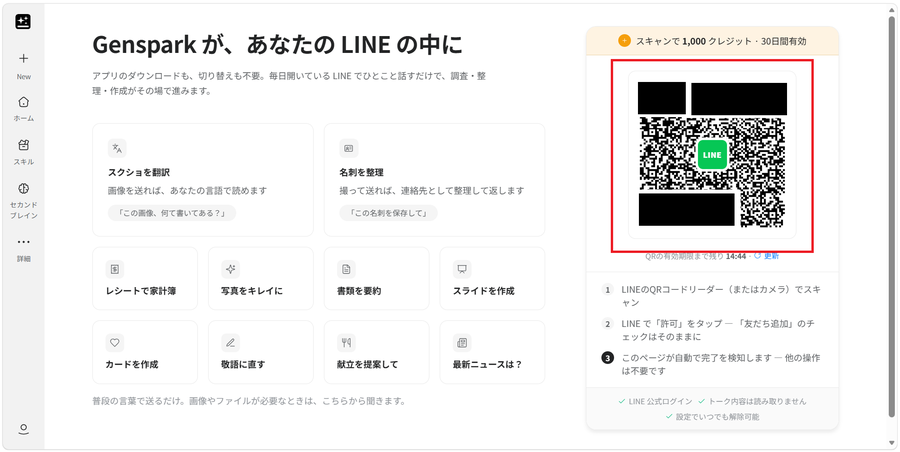
Next, add Genspark as a friend on LINE.
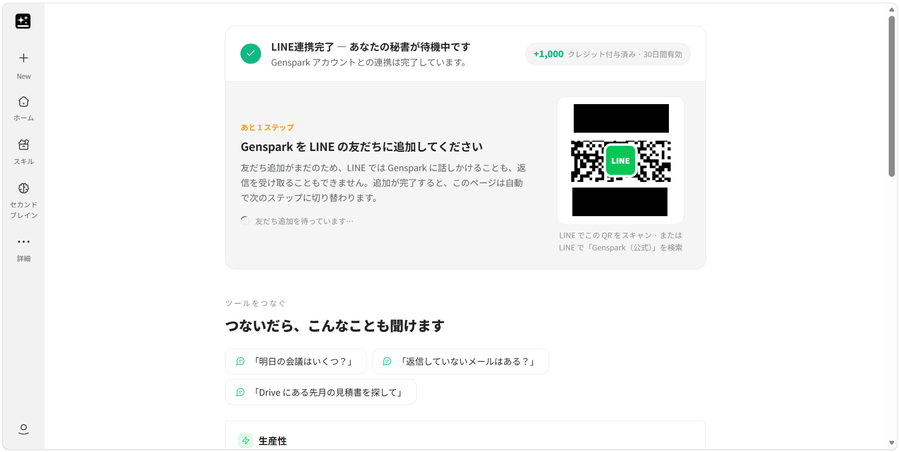
Once the connection is complete, you can chat with Genspark through LINE just like you would with any other LINE contact.
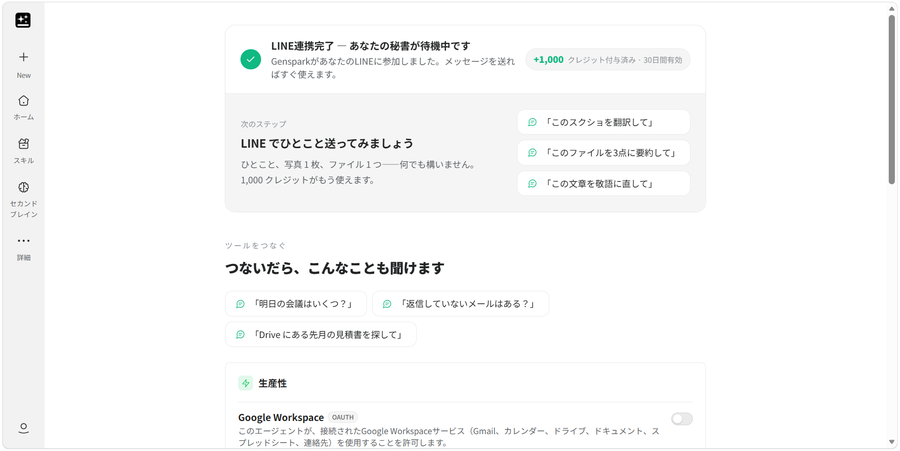
Open the LINE integration in Genspark on your PC → Scan the QR code with your smartphone → Add Genspark as a LINE friend
That's it.
Once you've completed the setup, you can simply send messages to Genspark through LINE.
How Many Credits Does It Use?
If you regularly use Genspark, you will probably be curious about credit consumption.
In my own tests,
normal conversations did not consume any credits.
However, when I used features such as web search, Google Calendar, or Gmail, around 20–30 credits were consumed.
These numbers are based on my own tests, so the credit costs could change in the future.
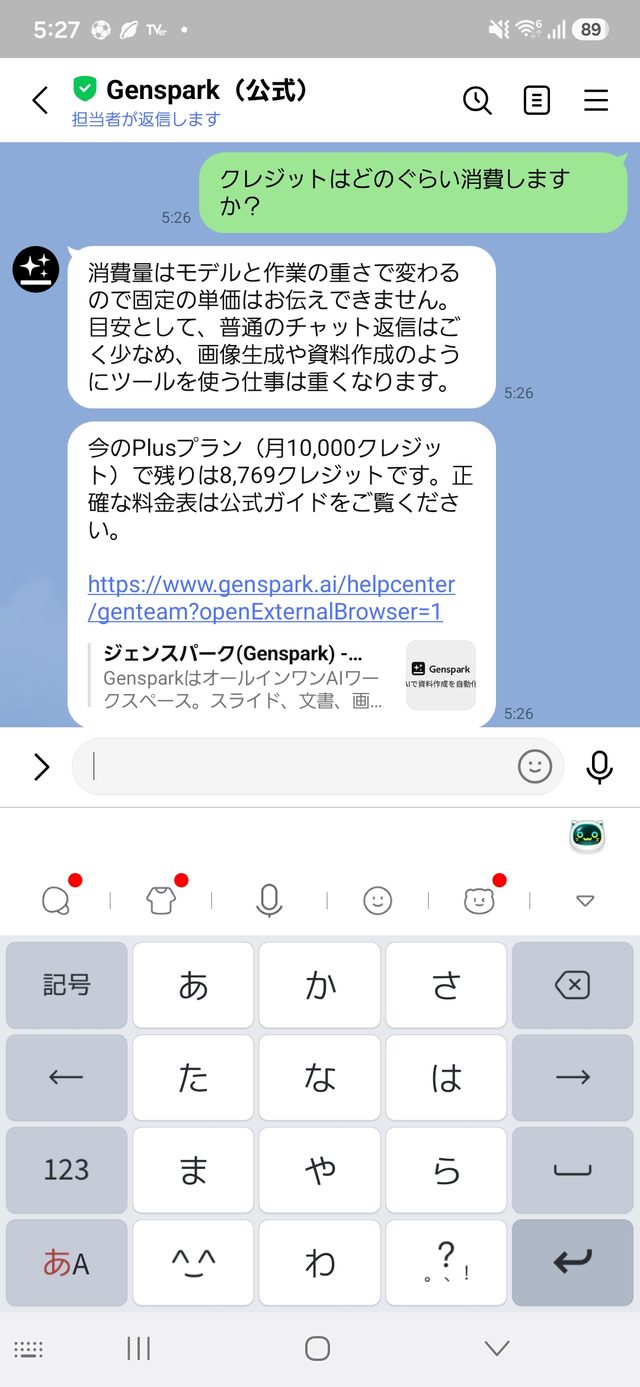
In particular, regarding web search, I am a paid Genspark user, and web searches through the browser version of Genspark do not consume credits for me.
Therefore, if you want to minimize credit usage, it may be better to use the browser version of Genspark for web searches.
That said, the main appeal of the LINE integration isn't really about saving credits.
What I find really interesting is that Genspark responds directly through the LINE interface I already use every day.
Getting 1,000 Credits Is a Nice Bonus
Another nice surprise when I connected LINE was that I received 1,000 credits simply for linking the service.
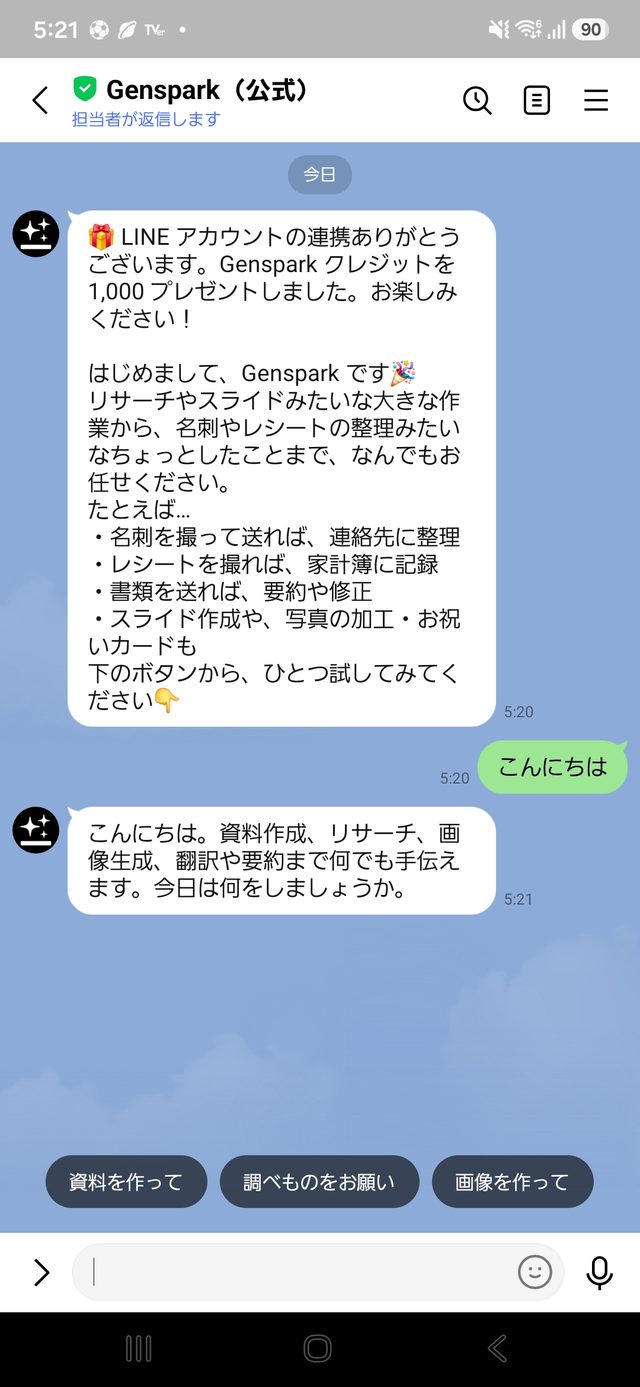
If you use Genspark regularly, 1,000 credits is a pretty useful bonus.
Since the LINE integration itself can be tried for free, I think it's worth setting up if you already use Genspark.
Using Genspark Through LINE Is More Interesting Than I Expected
When I first noticed the feature, my reaction was simply:
"Oh, Genspark is integrated with LINE now."
I didn't expect much more than that.
But after actually trying it, I found that I could:
- Ask Genspark questions directly from LINE
- Check my Google Calendar schedule
- Check recent Gmail messages
- Generate images from LINE
- Use web search
- Receive a LINE notification when the response is ready
So there are actually quite a few ways to use it.
The most interesting part for me is that you don't have to think, "I need to use Genspark," and then open Genspark.
If you're already using LINE, you can simply ask Genspark whenever something comes to mind.
That convenience feels surprisingly fresh when you actually try it.
You do need to keep an eye on credit consumption when using certain features, but for quickly asking AI something while commuting or away from your PC, I think this is a particularly useful way to use Genspark.
If you already use Genspark, check your PC version of the AI chat and see if you have the message "Talk to AI on LINE, even during your commute →."
If you live in Japan and use LINE regularly, this feature is definitely worth trying.